Run Your Entire Fleet from One Screen — Real-Time Locations, Jobs, and Analytics
ArrivalLink's Fleet Command gives you a bird's-eye view of every technician, every job, and every metric. Know what's happening across your entire operation — in real time.
Text Message
Your technician Robert W. is on the way! Track live: arrivallink.com/tr...
The Real Problem
Why Fleet Command Dashboard Lose Customers Before the Job Even Starts
These four problems cost the average plumbing company over $40,000 a year in lost revenue and bad reviews.
You Don't Know Where Your Techs Are Right Now
Without a live fleet map, you're guessing who's where. A customer calls about a late tech and you have to call the tech to find out. Embarrassing and slow.
Job Completion Data Lives in Everyone's Head
How many jobs did you complete this week? Which tech is fastest? What's your average job time? If the answer is 'I don't know,' you're flying blind.
You Can't Improve What You Can't Measure
Without analytics, you can't identify slow routes, underperforming techs, or peak demand days. You make gut decisions instead of data-driven ones.
Managing 5+ Techs Without a Dashboard Is Chaos
Whiteboards, spreadsheets, group texts — the bigger your team gets, the harder it is to keep everyone coordinated. Something always falls through the cracks.
What if homeowners could watch your plumber arrive — like tracking an Uber?
The Solution
Three Steps. Zero Guesswork. Happy Customers.
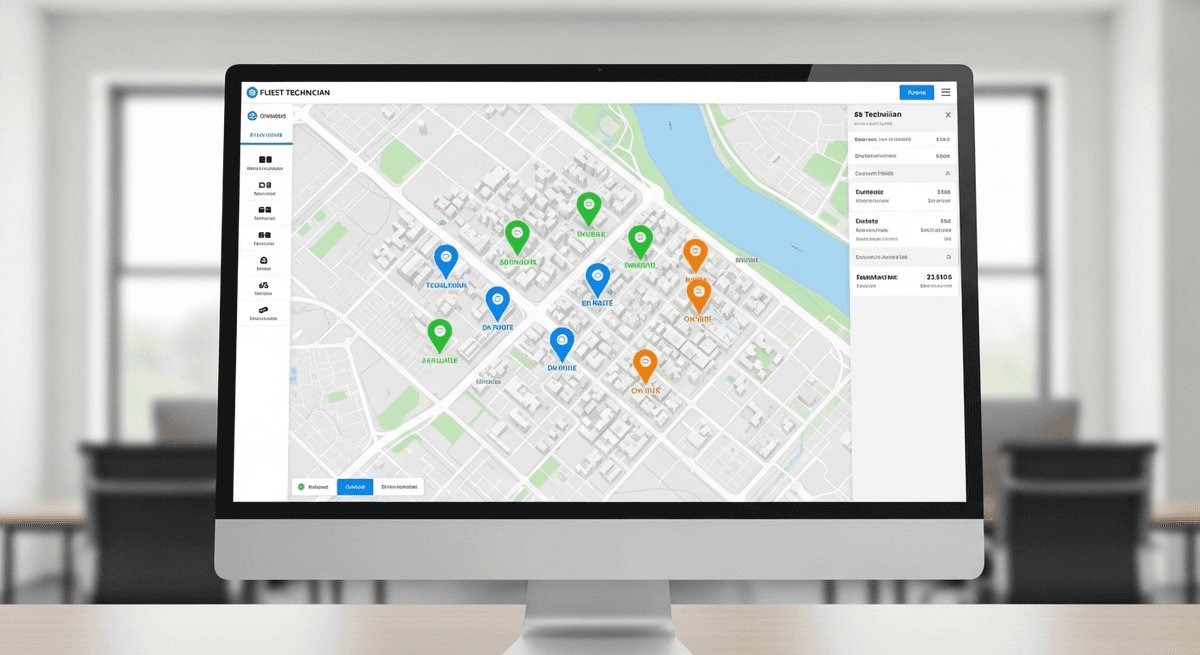
See All Techs on a Live Map
The fleet map shows every active technician's real-time location, status (en route, on-site, available), and current job. Click any dot for full details.
Manage Jobs, Team, and History in One Place
Switch between fleet map, job board, team management, trip history, analytics, and settings — all in the same dashboard. No tab-switching needed.
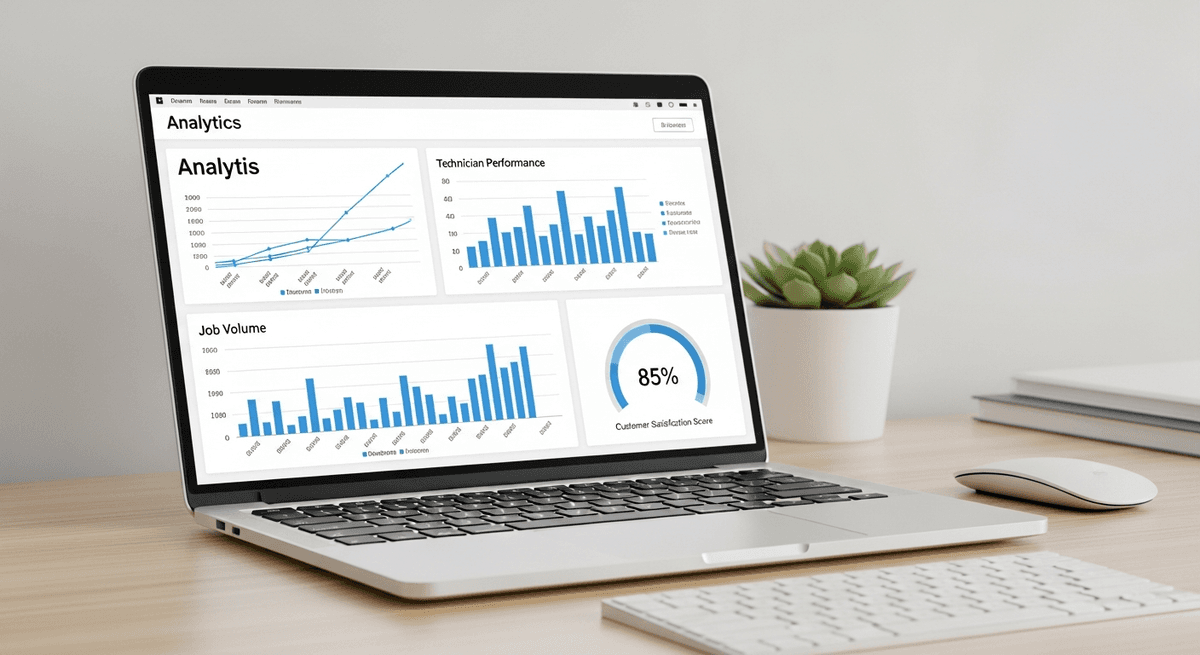
Track Trends and Optimize
Analytics show job completion trends, tech performance, customer ratings, and peak demand periods. Make data-driven decisions that grow your business.
See All Techs on a Live Map
The fleet map shows every active technician's real-time location, status (en route, on-site, available), and current job. Click any dot for full details.
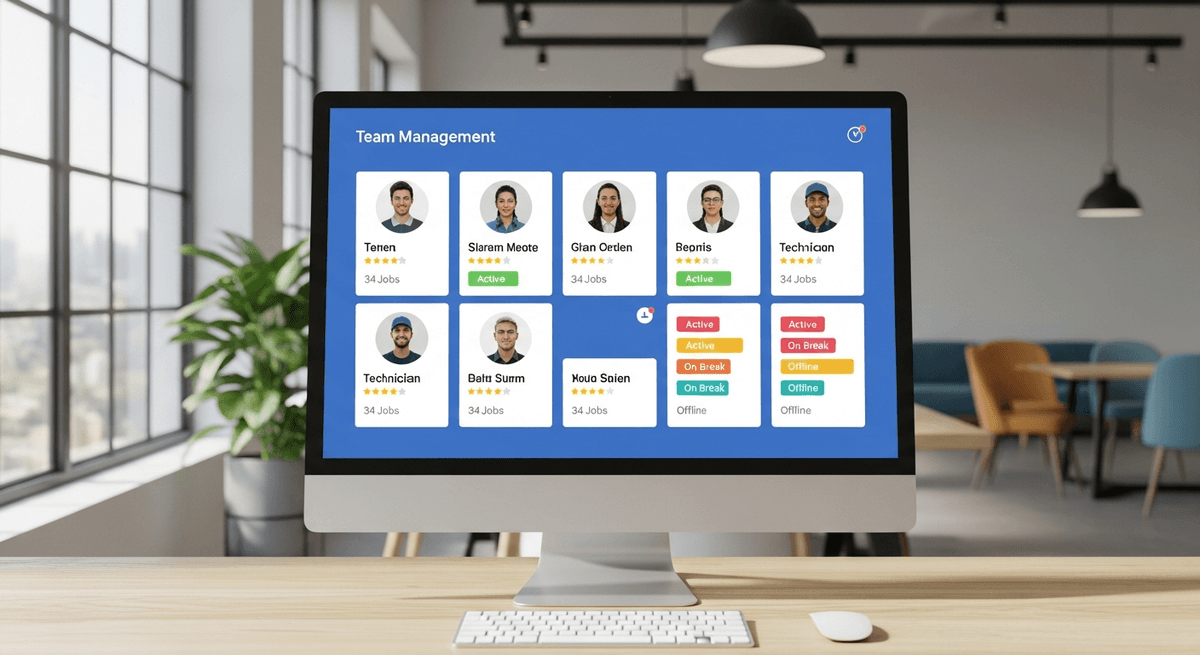
Manage Jobs, Team, and History in One Place
Switch between fleet map, job board, team management, trip history, analytics, and settings — all in the same dashboard. No tab-switching needed.
Track Trends and Optimize
Analytics show job completion trends, tech performance, customer ratings, and peak demand periods. Make data-driven decisions that grow your business.
The Results
What Happens When You Stop Guessing and Start Tracking
Based on average results from service teams using ArrivalLink for live dispatch tracking and automated customer communication.
How It Works For You
Total Operational Visibility — From the Office or the Road
Live Fleet Map With Every Tech's Position
See all technicians on an interactive map updated in real-time. Each tech shows as a color-coded dot with their status. Click for full details: current job, next job, speed, and schedule.
- Real-time GPS positions for all active techs
- Color-coded by status: en route, on-site, available
- Click any tech for detailed job information
- Zoom in to street level for precise locations
Data-Driven Insights That Help You Grow
See job completion trends, average trip times, customer satisfaction scores, and per-tech performance — all visualized in clean charts. Identify patterns, catch problems early, and make smarter decisions.
- Job volume trends by day, week, and month
- Per-technician performance comparison
- Customer satisfaction tracking over time
- Revenue-per-tech metrics for optimization
Manage Your Entire Team From One Panel
Invite technicians via SMS link, view their profile, driving stats, ratings, and trip history. Track performance and identify coaching opportunities.
- Invite techs with a single SMS link
- View driving stats and trip history per tech
- Star rating and review history visible
- Vehicle and photo management built-in
Turn Happy Customers into 5-Star Reviews
Don't let great service go unnoticed. ArrivalLink automatically asks for a review the moment the job is done—while the customer is still smiling.
Instant SMS Requests
We text the customer a review link immediately after the tech marks the job complete.
Filter Negative Feedback
Unhappy customers are guided to a private feedback form, keeping bad reviews off Google.
Chaos-Free Dispatching
Ditch the whiteboards and spreadsheets. Assign jobs in seconds, notify your team instantly, and see exactly where everyone fits in the day.
- 1
Visual Drag-and-Drop
Easily move jobs between technicians or time slots. No confusion.
- 2
Instant Tech Notifications
When you assign a job, your tech gets a text with all the details.
- 3
Real-Time Status Updates
See when jobs are started, en route, or completed—live on the board.
How It Works
Up and Running in Minutes
Set Up Your Team
Create your company account and invite your technicians via a secure link. No app install required.
Tech Starts a Trip
Your tech enters the customer's name and phone, taps Start. GPS broadcasting begins immediately.
Customer Tracks Live
Customer receives an SMS with a tracking link — live map, ETA, and a call button. No app needed.
Tech Arrives
Tech taps Arrived. Trip is logged automatically. The customer can rate their experience.
Set Up Your Team
Create your company account and invite your technicians via a secure link. No app install required.
Tech Starts a Trip
Your tech enters the customer's name and phone, taps Start. GPS broadcasting begins immediately.
Customer Tracks Live
Customer receives an SMS with a tracking link — live map, ETA, and a call button. No app needed.
Tech Arrives
Tech taps Arrived. Trip is logged automatically. The customer can rate their experience.
Built for Small Teams
One Tool. One Job. Done Right.
ArrivalLink is not a CRM. Not a dispatch tool. Not an invoicing platform. It's laser-focused on one thing: giving your customers a professional arrival experience.
What we replace
- Texting customers "he's 15 minutes away"
- "Where's my tech?" phone calls
- Guessing when your team will arrive
What we add
- Automated SMS tracking links
- Real-time GPS on a branded map
- One-tap tech workflow
Owner Dashboard
ArrivalLink Fleet Command
Active Trips3/10
2/5
22min
Mike J.
Sarah K.
Pricing
Simple, Transparent Pricing
No contracts. No hidden fees. Cancel anytime.
FAQ
Answers to Your Top Questions
Everything you need to know before you start your free trial.
Yes. The owner dashboard is a progressive web app that works in any browser. On mobile, you can add it to your home screen for an app-like experience. The fleet map and key metrics are fully mobile-responsive.
Six: Fleet Map, Jobs, Team, History, Analytics, and Settings. Everything you need to run your operation lives in one place.
Yes. The History tab shows all completed trips with timestamps, tech assignments, customer ratings, and duration. Filter by date range, tech, or job type.
Job completion trends, average trip times, customer rating trends, per-technician performance, and peak demand periods. All displayed in visual charts and exportable.
Yes. The Pro plan supports multiple dashboard users. Your office manager, dispatcher, and owner can all access the same real-time view simultaneously.
The fleet map uses the same GPS that powers the customer-facing tracking pages — updates every 3 seconds with street-level accuracy. You see exactly where your techs are.
The full dashboard with fleet map, analytics, and team management is included in the Pro plan ($59/mo). The Starter plan includes basic job tracking without the advanced features.
The dashboard is organized into logical tabs. While the layout isn't customizable, each tab is designed around the most common workflows: monitor techs (Fleet Map), manage work (Jobs), track team (Team), and review performance (Analytics).
Running a Fleet Without a Dashboard Is Like Driving With Your Eyes Closed
Get total visibility into your operation. Live fleet map, analytics, team management — all in one screen. Start your free trial.