Window Cleaners: Stop Losing $500/Week to Customers Who Aren't Home When You Arrive
You drive to the job, nobody's home, the gate is locked, and the dog is loose in the backyard. ArrivalLink sends automated reminders and live ETA links so customers are ready when you pull up — every single time.
Text Message
Your technician Ryan L. is on the way! Track live: arrivallink.com/tr...
The Real Problem
Why Window Cleaning Lose Customers Before the Job Even Starts
These four problems cost the average plumbing company over $40,000 a year in lost revenue and bad reviews.
Locked Gates and Empty Houses Waste Your Route
You scheduled 12 stops today. Three customers aren't home, one gate is locked, and one forgot they booked. That's 2+ hours of wasted drive time and $300 in lost revenue — every single week.
Seasonal Demand Creates Scheduling Chaos
Spring and summer mean packed schedules. Fall means cancellations. Without automated communication, your team spends more time confirming appointments than actually cleaning windows.
Recurring Clients Still Ask 'When Are You Coming?'
Even quarterly clients who've used you for years text every time: 'What day are you coming this month?' 'What time?' Multiply that by 40 recurring clients and your phone never stops.
You're Losing Recurring Revenue to Silent Churn
Customers don't cancel window cleaning — they just stop rebooking. No review request, no follow-up, no touchpoint. They drift to the next cleaner who shows up on Nextdoor.
What if homeowners could watch your plumber arrive — like tracking an Uber?
The Solution
Three Steps. Zero Guesswork. Happy Customers.
Automated Reminders Prep the Customer
24 hours before service, ArrivalLink texts the customer: 'We're coming tomorrow — please unlock the gate and secure pets.' Day-of, they get a live tracking link with the crew's real-time ETA.
Customer Knows Exactly When You'll Arrive
No app. No login. They tap the link and see a branded map with your crew's location on the route, their position in the queue, and a dynamic countdown. They're home, the gate is open, and you clean without delay.
Windows Sparkling, Review Collected
After the crew moves to the next stop, ArrivalLink texts the customer a review request. They look through crystal-clear windows and tap 5 stars. Your reputation grows with every route.
Automated Reminders Prep the Customer
24 hours before service, ArrivalLink texts the customer: 'We're coming tomorrow — please unlock the gate and secure pets.' Day-of, they get a live tracking link with the crew's real-time ETA.
Customer Knows Exactly When You'll Arrive
No app. No login. They tap the link and see a branded map with your crew's location on the route, their position in the queue, and a dynamic countdown. They're home, the gate is open, and you clean without delay.
Windows Sparkling, Review Collected
After the crew moves to the next stop, ArrivalLink texts the customer a review request. They look through crystal-clear windows and tap 5 stars. Your reputation grows with every route.
The Results
What Happens When You Stop Guessing and Start Tracking
Based on average results from service teams using ArrivalLink for live dispatch tracking and automated customer communication.
How It Works For You
The Tools That Turn Window Cleaning Routes Into Revenue Machines
Live Route Tracking That Eliminates Wasted Stops
Every customer on your daily route gets a personalized tracking link. They see your crew's location on the route, their position in the queue, and a dynamic ETA. They know you're coming — so they unlock the gate, secure the dog, and let you work.
- Route-aware ETA shows position in the daily queue
- Branded with your company logo and colors
- Crew lead's name and photo displayed
- Works on any phone — no app download required

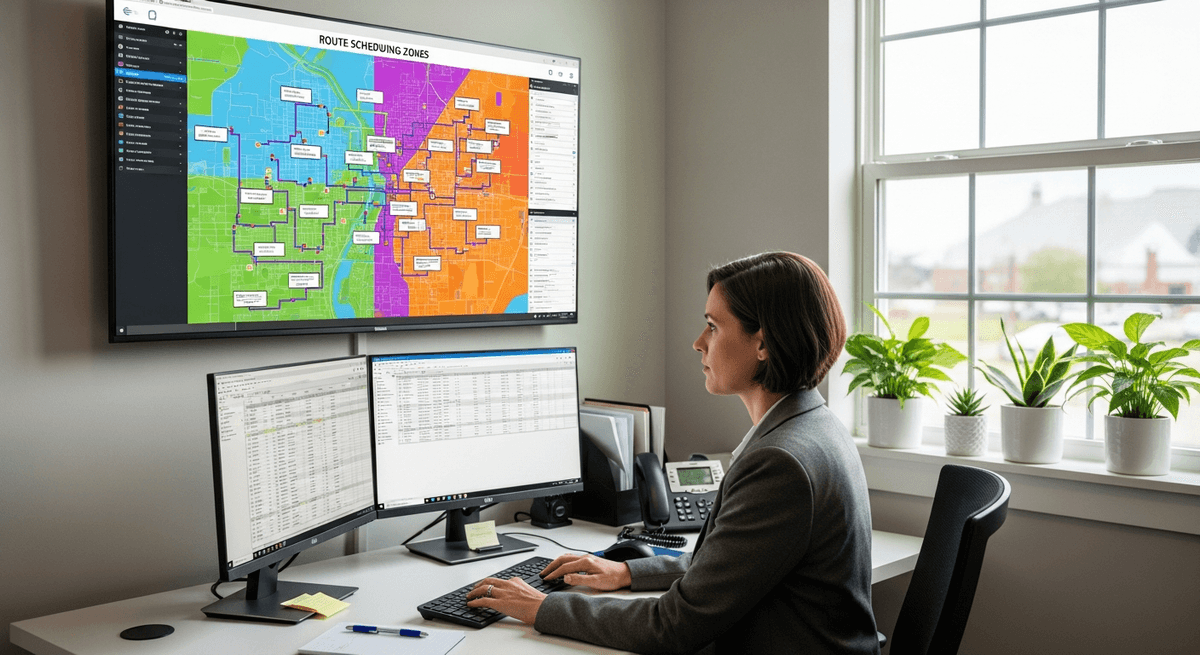
Smart Route Scheduling for Maximum Stops Per Day
Build optimized daily routes that minimize drive time and maximize billable stops. ArrivalLink's board lets you group jobs by neighborhood, set realistic time windows, and handle add-ons and cancellations without derailing the whole route.
- Route optimization by neighborhood and zone
- Drag-and-drop daily route building
- Recurring schedule management for regular clients
- Automatic resequencing when jobs are added or canceled
Automated Reviews That Lock In Recurring Revenue
Every completed stop is a review opportunity. ArrivalLink sends a request right after your crew moves to the next house — while the customer is admiring streak-free windows. More reviews = more recurring bookings from neighbors who see your work.
- Automated post-stop review request via SMS
- Smart routing: happy → Google, unhappy → private feedback
- Route-level reporting shows reviews per neighborhood
- Turn every route into a neighborhood marketing campaign

Turn Happy Customers into 5-Star Reviews
Don't let great service go unnoticed. ArrivalLink automatically asks for a review the moment the job is done—while the customer is still smiling.
Instant SMS Requests
We text the customer a review link immediately after the tech marks the job complete.
Filter Negative Feedback
Unhappy customers are guided to a private feedback form, keeping bad reviews off Google.
Chaos-Free Dispatching
Ditch the whiteboards and spreadsheets. Assign jobs in seconds, notify your team instantly, and see exactly where everyone fits in the day.
- 1
Visual Drag-and-Drop
Easily move jobs between technicians or time slots. No confusion.
- 2
Instant Tech Notifications
When you assign a job, your tech gets a text with all the details.
- 3
Real-Time Status Updates
See when jobs are started, en route, or completed—live on the board.
How It Works
Up and Running in Minutes
Set Up Your Team
Create your company account and invite your technicians via a secure link. No app install required.
Tech Starts a Trip
Your tech enters the customer's name and phone, taps Start. GPS broadcasting begins immediately.
Customer Tracks Live
Customer receives an SMS with a tracking link — live map, ETA, and a call button. No app needed.
Tech Arrives
Tech taps Arrived. Trip is logged automatically. The customer can rate their experience.
Set Up Your Team
Create your company account and invite your technicians via a secure link. No app install required.
Tech Starts a Trip
Your tech enters the customer's name and phone, taps Start. GPS broadcasting begins immediately.
Customer Tracks Live
Customer receives an SMS with a tracking link — live map, ETA, and a call button. No app needed.
Tech Arrives
Tech taps Arrived. Trip is logged automatically. The customer can rate their experience.
Built for Small Teams
One Tool. One Job. Done Right.
ArrivalLink is not a CRM. Not a dispatch tool. Not an invoicing platform. It's laser-focused on one thing: giving your customers a professional arrival experience.
What we replace
- Texting customers "he's 15 minutes away"
- "Where's my tech?" phone calls
- Guessing when your team will arrive
What we add
- Automated SMS tracking links
- Real-time GPS on a branded map
- One-tap tech workflow
Owner Dashboard
ArrivalLink Fleet Command
Active Trips3/10
2/5
22min
Mike J.
Sarah K.
Pricing
Simple, Transparent Pricing
No contracts. No hidden fees. Cancel anytime.
FAQ
Answers to Your Top Questions
Everything you need to know before you start your free trial.
Yes. Set up recurring schedules for every client frequency — weekly, monthly, quarterly, or seasonal. ArrivalLink sends automated reminders before each visit and a fresh tracking link on service day.
Each customer on your route gets a personalized link showing the crew's real-time location and their position in the queue. Customer #8 can see the crew is currently at stop #6 with an updated ETA.
That's exactly what they do. The day-before reminder tells customers to unlock gates, secure pets, and move furniture from windows. Our users report 58% fewer wasted stops after turning on reminders.
Yes. The scheduling board lets you group jobs by zone, neighborhood, or zip code. Build tight routes that maximize billable stops and minimize windshield time between jobs.
No. ArrivalLink runs in any mobile browser. Crew leads open the link, sign in, and start the route. Add it to the home screen for a native feel — takes 10 seconds.
Each completed stop triggers its own review request. Complete 12 stops in a day, get 12 review requests sent automatically. That's 60 review opportunities per week per crew.
Yes. The scheduling board makes it easy to add extra routes during spring/summer peaks and consolidate during slower months. Customer communication stays automated regardless of volume.
Starter plan is $29/month for up to 3 crews. Pro plan is $59/month for up to 10 crews with analytics, scheduling, and custom branding. Both include a 7-day free trial. No contracts — cancel anytime.
Every Locked Gate and Empty House Is Money You Drove To and Didn't Collect
Automated reminders and live tracking links ensure customers are home, gates are open, and pets are secured. Stop wasting fuel and time on wasted stops.