Stop Hoping for Reviews — Start Collecting Them Automatically After Every Job
ArrivalLink sends a review request the moment the job is done. Happy customers go to Google. Unhappy customers go to a private feedback form. Your rating climbs. Your competitors wonder how.
Text Message
Your technician David P. is on the way! Track live: arrivallink.com/tr...
The Real Problem
Why Automated Review Collection Lose Customers Before the Job Even Starts
These four problems cost the average plumbing company over $40,000 a year in lost revenue and bad reviews.
Happy Customers Don't Leave Reviews on Their Own
Only 5–10% of satisfied customers leave a review unprompted. The other 90% loved your work, told their neighbor, and moved on. That's thousands of lost 5-star reviews every year.
Unhappy Customers Go Straight to Google
A frustrated customer doesn't call you first — they open Google Maps and start typing. By the time you find out, the 1-star review is already live and visible to every future lead.
Every Bad Review Costs You $300+ in Lost Revenue
A single 1-star review can drop your local ranking and cost you dozens of leads. Most businesses don't realize how much revenue is silently leaking through bad review management.
Asking for Reviews Manually Doesn't Scale
Your technicians forget. Your office staff is too busy. Handing out business cards with 'Please review us!' stopped working in 2015.
What if homeowners could watch your plumber arrive — like tracking an Uber?
The Solution
Three Steps. Zero Guesswork. Happy Customers.
Tech Completes the Job
When the technician taps 'Arrived' and the job wraps up, ArrivalLink automatically triggers the review collection flow.
Customer Gets a Smart Review Request
A short, friendly SMS asks the customer to rate their experience. One tap. Takes 5 seconds.
Happy → Google. Unhappy → Private Feedback.
5 stars? Direct link to your Google Business listing. Less than 5? A private feedback form so you can fix the issue before it goes public.
Tech Completes the Job
When the technician taps 'Arrived' and the job wraps up, ArrivalLink automatically triggers the review collection flow.
Customer Gets a Smart Review Request
A short, friendly SMS asks the customer to rate their experience. One tap. Takes 5 seconds.
Happy → Google. Unhappy → Private Feedback.
5 stars? Direct link to your Google Business listing. Less than 5? A private feedback form so you can fix the issue before it goes public.
The Results
What Happens When You Stop Guessing and Start Tracking
Based on average results from service teams using ArrivalLink for live dispatch tracking and automated customer communication.
How It Works For You
Build a 5-Star Reputation on Autopilot
Intelligent Routing That Protects Your Reputation
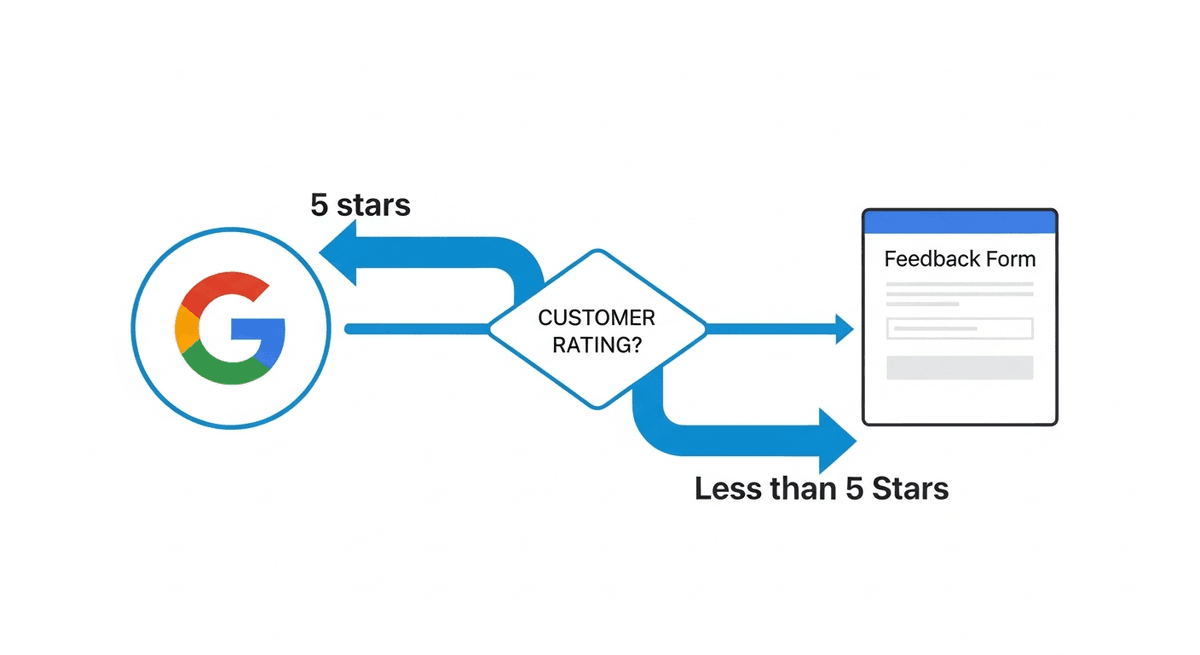
ArrivalLink doesn't just collect reviews — it routes them intelligently. Happy customers are sent to your Google listing. Unsatisfied customers are routed to a private feedback form where you can fix the issue offline.
- Happy customers → direct Google review link
- Unhappy customers → private feedback form
- Prevents negative reviews from going public
- Gives you a chance to fix issues before they escalate
Track Your Reputation Over Time
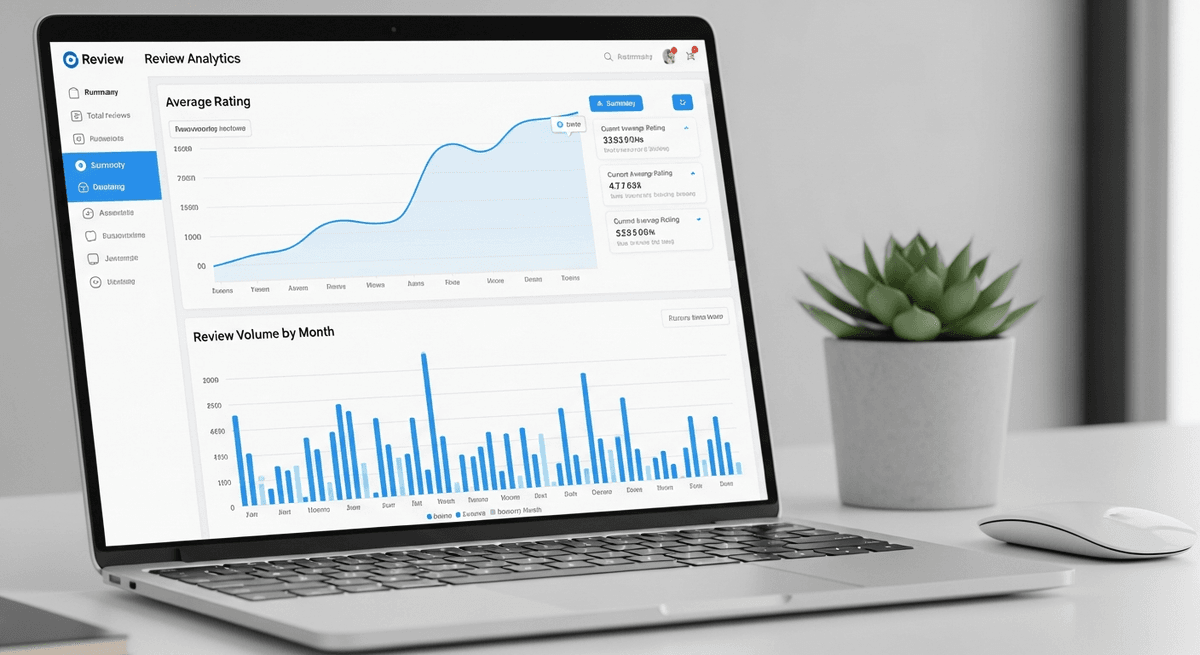
See your average rating, review volume, and trends over time in a clean dashboard. Identify your top-performing technicians and catch issues early.
- Average rating trend chart over time
- Per-technician rating breakdown
- Review volume tracking by week and month
- Private feedback log for internal improvement
Set It Once. Collect Reviews Forever.
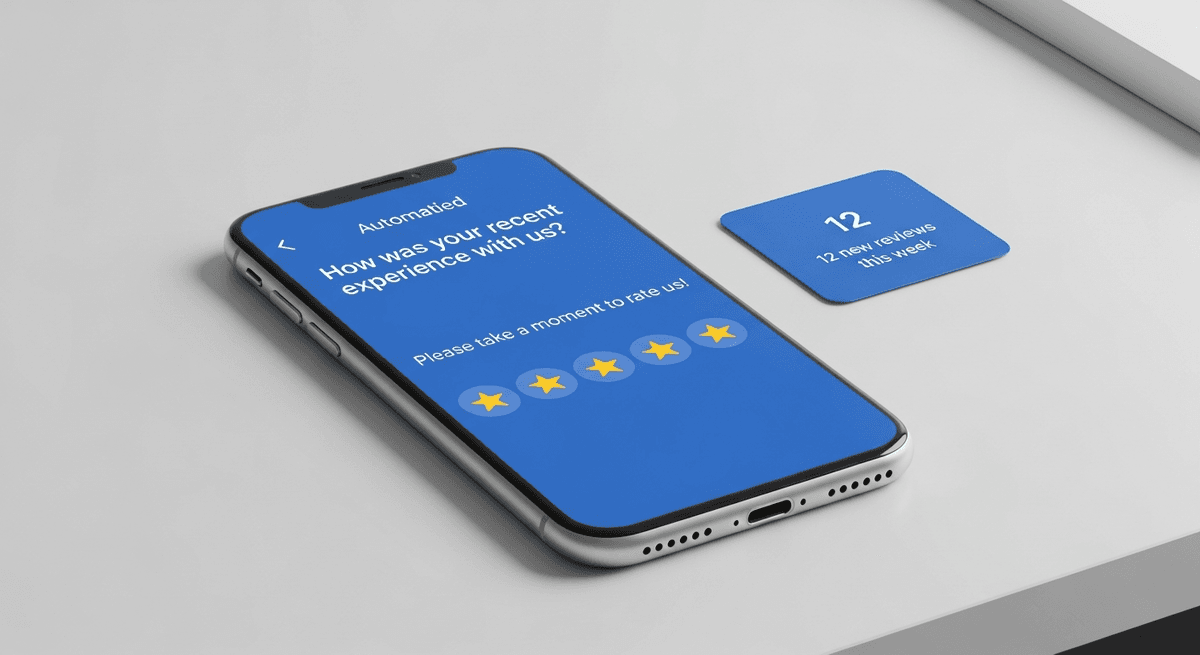
Review automation runs in the background after every completed job. No manual intervention, no reminders, no follow-up emails. Turn it on once and your review count starts climbing.
- Fires automatically on every completed job
- No technician or dispatcher action needed
- Toggle on/off globally or per-job
- Works 24/7 including weekends and holidays
Turn Happy Customers into 5-Star Reviews
Don't let great service go unnoticed. ArrivalLink automatically asks for a review the moment the job is done—while the customer is still smiling.
Instant SMS Requests
We text the customer a review link immediately after the tech marks the job complete.
Filter Negative Feedback
Unhappy customers are guided to a private feedback form, keeping bad reviews off Google.
Chaos-Free Dispatching
Ditch the whiteboards and spreadsheets. Assign jobs in seconds, notify your team instantly, and see exactly where everyone fits in the day.
- 1
Visual Drag-and-Drop
Easily move jobs between technicians or time slots. No confusion.
- 2
Instant Tech Notifications
When you assign a job, your tech gets a text with all the details.
- 3
Real-Time Status Updates
See when jobs are started, en route, or completed—live on the board.
How It Works
Up and Running in Minutes
Set Up Your Team
Create your company account and invite your technicians via a secure link. No app install required.
Tech Starts a Trip
Your tech enters the customer's name and phone, taps Start. GPS broadcasting begins immediately.
Customer Tracks Live
Customer receives an SMS with a tracking link — live map, ETA, and a call button. No app needed.
Tech Arrives
Tech taps Arrived. Trip is logged automatically. The customer can rate their experience.
Set Up Your Team
Create your company account and invite your technicians via a secure link. No app install required.
Tech Starts a Trip
Your tech enters the customer's name and phone, taps Start. GPS broadcasting begins immediately.
Customer Tracks Live
Customer receives an SMS with a tracking link — live map, ETA, and a call button. No app needed.
Tech Arrives
Tech taps Arrived. Trip is logged automatically. The customer can rate their experience.
Built for Small Teams
One Tool. One Job. Done Right.
ArrivalLink is not a CRM. Not a dispatch tool. Not an invoicing platform. It's laser-focused on one thing: giving your customers a professional arrival experience.
What we replace
- Texting customers "he's 15 minutes away"
- "Where's my tech?" phone calls
- Guessing when your team will arrive
What we add
- Automated SMS tracking links
- Real-time GPS on a branded map
- One-tap tech workflow
Owner Dashboard
ArrivalLink Fleet Command
Active Trips3/10
2/5
22min
Mike J.
Sarah K.
Pricing
Simple, Transparent Pricing
No contracts. No hidden fees. Cancel anytime.
FAQ
Answers to Your Top Questions
Everything you need to know before you start your free trial.
No. Each customer receives exactly one review request per completed job. There are no follow-ups or reminder texts. It's a single, respectful request.
Yes. You add your Google Business review link in settings. When a happy customer taps the review button, they're taken directly to your Google Business listing with the review form open.
You receive the feedback in your ArrivalLink dashboard. You can see exactly which job it's tied to, which tech handled it, and what the customer said. This gives you the chance to reach out and resolve the issue directly.
Currently, the review link supports Google Business profiles, which is where 90%+ of local service searches happen. We're exploring Yelp and Facebook review integration for future updates.
Yes. You can toggle review automation on or off globally in settings, or skip it for specific jobs when needed.
The review request SMS is sent within minutes of the tech marking the job as complete. Timing is critical — customers are most likely to review when the experience is still fresh.
More reviews and higher average ratings are two of the strongest signals for Google local search ranking. Teams using ArrivalLink's review automation consistently see improvements in their local search visibility.
Automated review collection is included in the Pro plan ($59/mo). The Starter plan includes basic customer ratings but not the full Google review automation workflow.
Your Best Customers Are Walking Away Without Leaving a Review. Fix That Today.
Turn every completed job into a 5-star review opportunity. Automated. Intelligent. Effortless. Start your free trial.